Why aren't my Docline Odyssey requests matching? / Why do we get so many Docline Odyssey resend requests?

Lenders: Are you a Docline site that receives a LOT of resend requests for outgoing Odyssey documents? Do you often see "Missing TN" next to the Odyssey checkbox on your Lending requests? If so, it's probably not your fault. ILLiad and OCLC communicate through a web service, which helps prepopulate fields and ensure the right information is being sent. Since Docline doesn't have this ability, we use a series of ".lua scripts" to identify and place information within the requests. These scripts are installed with the ILLiad client and are updated as changes are made to Docline.gov. (This is also why we sometimes have to scramble and make quick releases if the NLM suddenly changes something on their pages.)
Out of all of the fields, the MOST IMPORTANT ONE is the "Patron Name" field on outgoing Borrowing requests. This field is like the "Verified" field in OCLC requests and contains the transaction number that allows outgoing Odyssey deliveries to match up with the pending Borrowing requests. While you CAN remove the last name and first name, you must leave the transaction information in a very specific format. For example, if the Borrowing library's transaction number was 12345, the format of this field MUST BE: TN: 12345 (see the example below).
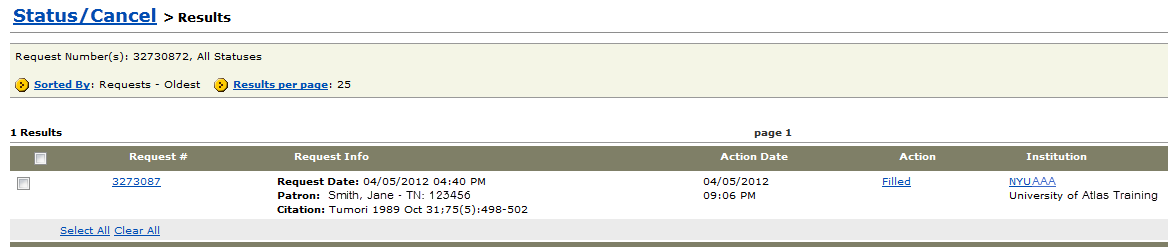
If it is not this exact format, incoming Odyssey deliveries will never match and be stuck in the "Receive" folder on your ILLiad server. These files are typically named as "0" and are overwritten as new unmatched items come into that folder. To find these unmatched documents, you'll need to go to the Borrowing ribbon and click on the Electronic Delivery button. In the pop up window, use the Process Files button to start the import process.
Borrowers: You can also prevent issues by making sure that the information you're sending via Docline is correct. To do this, log into your Docline account and click on the Institution tab.
- On the yellow ribbon, underneath this tab, there will be a button that says Update [your Docline symbol].
 Click there to open your Docline configuration settings. On the left-hand menu, there is an "Address" category, with a link to "Document Delivery." This will bring you right to your Odyssey IP section, where you should verify that the value is present and formatted as your Odyssey IP (123.456.789) or the corresponding DNS (e.g. illiad.lib.atlas-sys.com).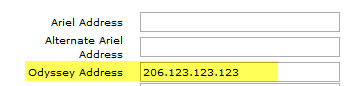
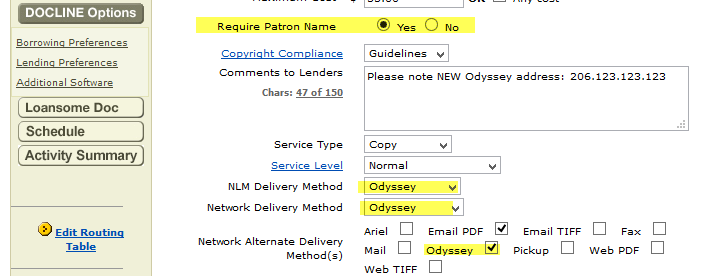
The correct value can be found in your ILLiad Customization Manager, inside the ILLiadServerIP key.You do NOT have to include /ILL or /ABC at the end of this value. The system does the matching on the Patron Name TN value, which is why it's so important to let ILLiad correctly populate that field. - Next, make sure you indicate your preference to receive Odyssey files, by clicking on the Docline Options category and marking the checkbox next to Odyssey. While you're in here - make sure that the Require Patron Name field is set to Yes (so you can't accidentally remove this and send out bad request details) and that the NLM and Network Delivery Method dropdowns also say Odyssey. Finally, you may want to include a note in the "Comment to Lenders" section, expressing your preference for Odyssey and including your Odyssey IP.
Finally, remember that if you see something, say something. Let the Borrowing library know that you noticed their Patron Name field isn't correctly formatted and save yourself from constant resend requests.
Comments
Please sign in to leave a comment.