Monitoring Uncirculated Items

Have you ever found a request flagged as overdue only to discover that the patron hasn't checked it out yet? It's a sad reality that patrons sometimes do not pick up the materials that we have worked so hard to find for them. Is there a way to deal with this situation without having to check the materials on the hold shelf every day?
Here's a couple of suggestions to help you manage this situation.
Customize Your Queue
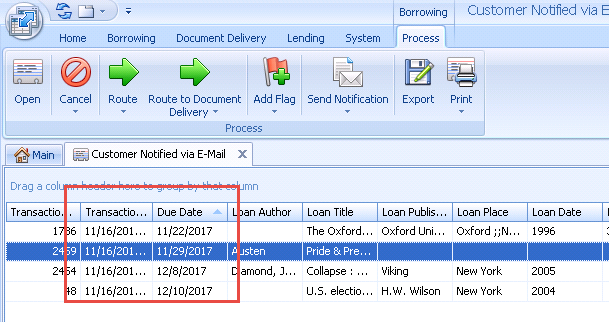
You can watch for items that haven't been picked up in the Customer Notified by Email queue. I recommend re-organizing the column in this queue to display the Due Date and the Transaction Date in the initial view when you open the queue. You can more easily monitor the queue for anything that's been hanging around for a while. To customize the queue, click and drag the column header to move these columns from their default locations to the left side of the queue.
Now you can check for Due Dates that less than two days away. These items that may need to be returned to the lending library soon. From this view, you can create a list of items to pull from the hold shelf that need to be returned to the lending library before it becomes overdue.
Create a Reminder Notice
To help keep these items to a minimum, you may want to send reminder notices to patrons when it's been more than a week since the notification was sent. The Transaction Date is a good reference point for this situation. This date is an indicator of the last time the request was updated or opened. In most cases, this date will reflect the day the item arrived and the patron was notified. Monitor the queue for transactions where the Transaction Date is more than a week old. You can then open these requests to identify the patron and contact him/her again about the item's availability. Take this one step further by creating a custom reminder notice that can be sent directly from the ILLiad request when you open it. Our documentation can guide you through that process here: https://support.atlas-sys.com/hc/en-us/articles/360011806874
Implement these best practices to keep those uncirculated ILL items to a minimum.
Comments
Please sign in to leave a comment.